Throttle
Summary: A Throttle (or Cab) is a device employed to control the locomotives and other aspects of the layout, such as turnouts, animation, lighted passenger cars, etc. They are usually handheld and portable. Some may be equipped with radios for wireless communications with the command station.
| Main Topics |
|
| Misc Items |
|
Types of Throttles
There are many types of throttles available, with some features overlapping the various types. The variety of throttle types range from stationary, tethered (throttle connected via wires), memory walk-around, and tetherless – no wires – using infrared and radio. Each of these throttles can be anything from full-featured to simple basic throttles, but not necessarily with all the other options.
Here's a quick summary of the types of throttles before digging into the details below:
- Utility
- A basic throttle is designed for simply operating locomotives lacking capability to change configuration variables (CVs). These are typically called Operator or Engineer throttles.
- Advanced
- Full featured throttles that can operate locomotives, manage consists, alter CVs, and control turnouts.
- Wired
- A throttle that must be physically connected to a the throttle network. These can be any type of the above listed throttles.
- Wireless
- A throttle that can connect wirelessly (RF or Infrared) to the throttle network.
Throttle Network
- Main article: Throttle_Network
A Throttle network is a separate data bus connecting the throttles and other accessories to the command station.
Various Throttles
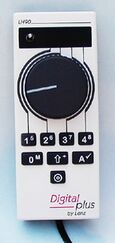
Lenz Engineer Throttle LH90
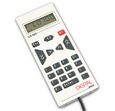
Lenz Dispatcher throttle LH100
Lenz Dispatcher throttle LH101
![Digitax DT200, acts as a DT100 when used with a command station.[1] The DT100 is almost identical in appearance.](/images/thumb/1/17/DT200.jpg/115px-DT200.jpg)
Digitax DT200, acts as a DT100 when used with a command station.[1] The DT100 is almost identical in appearance.
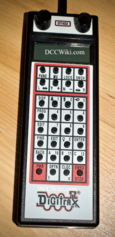
Digitrax DT402 Advanced Throttle
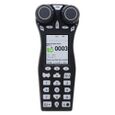
Digitrax DT602 Advanced Throttle
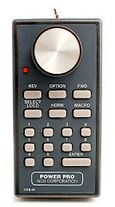
NCE Cab04 Throttle
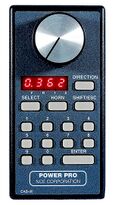
NCE Cab06 Throttle
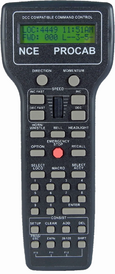
NCE Pro Cab


Utility or Operator Throttle

A Utility Throttle is a basic throttle with the features needed to operate a locomotive. They are sometimes called an Operator or Engineer throttle, as they are a lower cost throttle with limited features for operations. They lack the ability to alter CVs, and often may not have a display. Address selection is usually with switches, and only allow control of a single train. Since they are limited in features, they are usually smaller than an Advanced Throttle.
They are preferred for use at operating sessions as their inability to program or alter CVs eliminates the possibility of an inexperienced operator making changes to multifunction decoders either accidentally or on purpose.
Advanced Throttle
Advanced Throttles are fully featured throttles, with all the functions available to the user, including the ability to alter CVs. They may allow for control of multiple locomotives, offer a multiline display, plus the ability to create and break up consists. Lenz calls their advanced throttle the Dispatcher throttle.
In addition to the features of a utility throttle, they often offer control of turnouts and stationary decoders, signal displays, and possibly a fast clock. They can also do additional functions which may not be needed during an operating session. Advanced throttles offer access to all the features of the command station.
Throttles such as the NCE Pro Cab have the capability to lock out certain features on it or other cabs.
Stationary Throttles
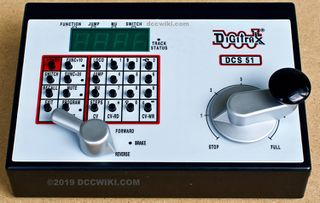
A stationary throttle, Digitrax DCS51
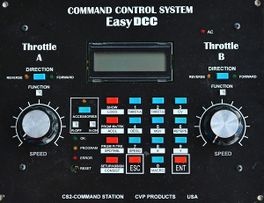
CVP Command station and throttles
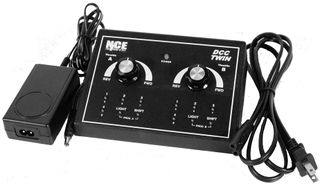
NCE Twin
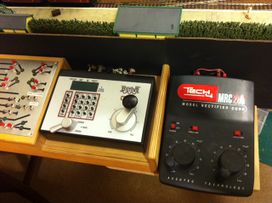
Digitrax Zephyr with MRC280 Dual Throttles connected to Jump Ports


Let's use the MRC Command 2000 type command station for this example. This is a stationary unit with three throttles. If you're going to have others operate trains with you, everyone will have to crowd around the base unit. Throttle 1 controls an analog (no decoder) locomotive, throttles 2 & 3 control DCC equipped locomotives. It should be noted that with this system, you can add one walk-around throttle. MRC's Command 2000 walk-arounds have two throttles (4 and 5); however, because of the architecture, throttles on walk-arounds control only addresses 7 & 9 or 8 & 10. This system supports up to 10 addresses with the wireless throttle, or six with the base station alone.
Others, such as CVP Products EasyDCC includes two throttles on the command station with the ability to add plug-in jacks around for additional walk-around throttles.
The Digitrax Zephyr has one throttle. Expansion is possible via LocoNet, to a limit of 20 throttles. Further expansion is possible by converting it to a booster and using it in conjunction with another command station. It also features a Jump Port which allows a powered analog throttle, such as a power pack, to be connected to the command station and control a DCC equipped locomotive.
Tethered


A tethered throttle is like the Digitrax Big Boy starter set with the DT200 throttle and DB100A booster. It is on a seven-foot cord and must remain plugged in while trains are running. The DT200 functions as the command station, so disconnecting it shuts down the system.[1]
Most manufacturers won't tell you a throttle must stay plugged in. If they don't state "all walk-around", or something to that effect, you can expect at least one throttle to not be walk-around.
The NCE Power Cab is an example of a tethered yet stationary throttle. Since the command station and booster are integrated into the handheld throttle, disconnecting it results in everything stopping. By adding a command station such as the Smart Booster, the throttle can be used as a walkaround/memory throttle.
Memory Walk-Around

A memory walk-around throttle must be plugged in to actually control the trains. However, you can unplug it to move the throttle to another location and plug it back into the throttle network. During the time the throttle is unplugged, the train continues to run at the same speed and direction. Be sure to check your system specifications before buying a DCC system if you want all your throttles to be "memory" walk-around.
- All Digitrax systems support this except for the Zephyr throttle (Built into the command station/booster) and the (discontinued) Big Boy.
- Digitrax's infrared throttles can also be used as a memory walk-around if you take them to a friend's layout that doesn't have an infrared system. Digitrax's radio throttles are both infrared and memory walk-around, they are the most versatile and will operate under any circumstance.
- EasyDCC wired throttles have memory and the trains will continue while the operator moves to another location to plug in. The throttle bus is durable and flexible coaxial cable.
Wireless (Tetherless)
- Main article: Simplex, Duplex and Infrared
By adding a suitable wireless gateway, a DCC system can be built which will support the use of wireless throttles, in addition to wired throttles. A wireless gateway is an optional enhancement available to many DCC systems. Unlike normal wired throttles, which are tethered to the layout by a cable, wireless throttles require no physical connection to the layout. Operators have a greater degree of freedom than with normal throttles, though they may or may not have the same degree of control as a wired throttle – some wireless throttles compromise on button count, or other features such as display size. Wireless throttles are generally battery powered.
Tetherless, or wireless throttles communicate either by radio or infrared light. Each of these has two communication modes: simplex and duplex. Simplex has one-way radio control. This means that there is only communication from the throttle to the DCC system. The throttle cannot receive any information from the DCC system, or command station. The throttle must be connected to the layout by its cable when selecting a locomotive since this action requires two-way communication.
An example of why you need duplex communication to acquire a locomotive: Let's say the yard hostler has put a train together and leaves the loco running at 5% throttle for you to acquire and take out. The only way your throttle will know the locomotive is already running forward at 5% throttle is if it can get that information from the command station at the time you select it. This process requires two-way communication. Once selected, only one way communication is required for you to control it.

Duplex (bi-directional) radio allows you to perform these functions without having to connect your throttle to the layout.
- Digitrax offers infrared and radio throttles that are simplex – that is they must be plugged into to acquire a new locomotive. Digitrax also offers duplex throttles that do not have to be plugged in to the LocoNet to select a loco. Although compatible with the infrared receivers, they require a different receiver from the simplex radio throttles for radio operation.
- Digitrax has discontinued the Simplex throttles. Some of the parts are no longer available, so Digtrax will not make new simplex throttles and will use their existing parts inventory for repairs.
- EasyDCC radio throttles are simplex radio transmission and communicate to wireless receivers located near the layout. Up to 16 wireless throttles may be active on a EasyDCC system and users can select locos wirelessly.
- NCE radio throttles are simplex and duplex. The Pro Cabs (ID 2-17) are duplex while engineer cabs (CAB04/CAB05) (ID 19-47) are simplex in that information is not transmitted back to the throttle to update the LCD display (these throttles don't have the displays). Users are able to select locos wirelessly.
- Please list other wireless systems here that are simplex/duplex and if they are infrared and/or radio.
An infrared (IR) throttle works almost like a simplex radio throttle - the main difference being reception. Because it uses light signals, it will not have the range of the radio throttle. You cannot use an infrared throttle outdoors as their IR signals cannot compete with the sun. Depending on the layout of the room, your system may require more receivers in rooms that are not conducive to bouncing light signals around.
Throttle networks which rely on polling such as the NCE Cab Bus require wireless throttles to operate in duplex mode. The command station will poll a throttle, and the throttle will then reply. This is the only way the command station will know which throttle is sending a command.
Tetherless (Wireless) Systems
| Wireless Throttles | DCCWiki.com | |||
|---|---|---|---|---|
| Manufacturer | Functions Supported | Number of Throttles Supported | Frequency Band | Range (Metres) |
| Digitrax | 0-29 | More than 20 | 2.4 GHz | 45 |
| NCE | 0-29 | 32 | 900 MHZ | 30 |
| CVP | 0-29 | More than 32 | 90 MHz | 30 |
| Notes: | All systems can support Functions 0 to 29, depending on the throttle used. All systems support the use of multiple receivers/transceivers. All support using individual identification codes so multiple systems can be in use without interference (in theory) between them, at for example, a train show. Multiple throttle types can be used (they must be the same brand). | |||
ESU Mobile Control II
ESU has launched a small, handheld wireless WiFi throttle based on an ARM processor running Android. It can interface with their command station using WLAN (Wireless LAN) or USB protocols.
Currently it is only supported by ESU Command stations but ESU is willing to work with other systems. It will supersede the ECoSControlRadio.
Roco WLANmaus Throttle
Roco offers a WiFi based handheld throttle, the WLANmaus. It is designed to work with their Z21 command station. It is similar to the Multimaus tethered and wireless throttles. It is a supplement to their app which allowed a smartphone or tablet to be used with the Z21. It will also work with the Digikeijs DR5000 command station.
It features 9,999 address capability, with 2014 turnout addresses, functions F0-F28, with the ability to program and read back CVs from multifunction decoders as well as stationary decoders.
This throttle is also available under the Fleischmann name.
Computer
Computers can also act as throttles, controlling trains around your layout so that you can spend your time doing other things. Please see connecting your computer to DCC for more details.
WiFi Throttle
Mobile devices on a WiFi network running a throttle app can act as full function throttles. Some systems require an intermediate personal computer running server software whereas others do not. See WiFi Throttle.
Notes
Some throttles have the capability of controlling more than one train at a time. Some throttles have more than one knob, or another method, which allows easy control more than one train at a time.
Some throttles have displays, others don't. However, those that don't usually have a way to tell what's going on with the train. With some throttles, there are wheels atop the throttle which lets you know which train you're controlling. You can tell the speed by simply looking at the knob.
Some throttles have one or more knobs for train control, some have buttons for train control, and some have knob(s) and buttons for train control.
Connecting Throttles
Throttles are connected with the command station via a throttle network. Please see the Throttle Network article for more information.
Editor's Notes
We need some people with experience on the systems to write these hints, especially the non-Digitrax stuff!
Here are links to each manufacturer's "hints" page.
- EasyDCC Throttle Hints - EasyDCC specific throttle hints
- Digitrax Hints/Throttle Troubleshooting - Hints for specific Digitrax Throttles
- DT100/DT100R
- DT200
- DT300/DT300R
- DT400/DT400R
- DT402/DT402R/DT402D
- UT1
- UT2
- UT4/UT4R/UT4D
- Lenz Thottle Hints - Lenz specific throttle hints
- NCE Throttle Hints - NCE specific throttle hints
See Also
- Throttle Network - How throttles are connected to a DCC system.
- Simplex, Duplex and Infrared - types of wireless connections for throttles.
- DCC Software
- LocoNet ID
External Links