JMRI
Summary: The Java Model Railroad Interface (JMRI) is a suite of programs that allows anyone to take full control of their layout using software.
Overview
JMRI is a collection of open-source tools for managing a model railroad layout and is released under the GNU V2 license. These tools are available as a single download is available directly from their website: https:/jmri.org
JMRI is built upon Java technology, giving it a degree of platform independence. Any modern computer is capable of running Java. Depending on what version of java installed, you might be restricted to using older versions of JMRI. See below for compatibility. If you can run version 11 (released in 2018) or higher, you can run the latest version of JMRI.
Features
JMRI Features:
- A database of decoders and a graphical interface for programming their features.
- See the JMRI Data Browser tool to browse the database.
- A database/inventory component
- An automation component for your layout
- Works on Mac OS X, Mac OS, Linux, Raspberry PI, and Windows.
Summary of tools
JMRI interfaces to many different command stations. JMRI comes bundled with various tools as a single install. There have been many arguments over the years about this, but for technical reasons bundling everything into one package is a more efficient use of resources as components can be shared and thus effectively maintained. Additionally, having a single installation helps new users get started quickly.
You do not need to learn/use all parts of the suite, for example, to program a decoder, it is not necessary to run the inventory or the layout automation components.
- DecoderPro - Useful for programming decoders.
- PanelPro - Provides the ability to design a control panel that is then used to control your layout.
- DispatcherPro - A system for dispatching, grouping your roster and throttles.
- OperationsPro - Build trains from your roaster which can provide manifests for your train crews.
- SoundPro - A set of tools for using audio with JMRI.
Requirements and Version Compatibility
JMRI requires that Java be installed, whether your computer is Mac, Windows, or Linux-based.
- JMRI 2.12 can run on any computer system that will run Java 1.5 or later.
- JMRI 2.14.1 requires Java 1.5 (or 1.6 if you want drag & drop).
- JMRI 3.10.1 requires Java 1.7 or later.
- JMRI 4.20 - 4.27 requires Java 1.8.
- Also known as Java 8.
- JMRI 4.99 and up (including 5.x) requires Java 11.
- JMRI 4.20 and higher will work with Java 11.
- Resist installing Java versions greater than 11. While it may work, there are incompatibilities which may arise.
See JMRI Java 11 details page for more information and installation.
Installation of Java
Ideally, installing Java 11 is preferred. However, older operating systems may require some hand holding and you may be limited on what version is Java is available. A compatible version of JAVA is required.
The current release of JMRI (5.x) will not work with Java 8. An upgrade to Java 11 is required, older (4.20.x +) releases work with Java 11.
Uninstall Java 8 prior to installing Java 11, otherwise the Java 11 installation will not be recognized. Oracle offers a tool to remove Java from the computer.
Oracle no longer offers the JRE (Java Runtime Environment) needed, but their JDK (Java Development Kit) supports current and upcoming JMRI releases. See the links below for more information on obtaining a suitable version of Java 11 for your platform.
Raspbery PI
A budget friendly Raspberry PI can easily handle the task of running JMRI. Although model RP2 is able to handle the workload, RP4 and RP5 can be purchased more readily and offers significant performance improvements. See https://www.jmri.org/install/Raspbian.shtml
Windows Xp / Vista SP1
JMRI 4.X will run on Windows XP or Windows Vista SP1, provided Java 1.8 is installed. Installation is a little difficult as Oracle's Java website will warn you that XP is obsolete, but an install package is still available. To install Java on Windows XP, download an Offline version for installation. Oracle does not support Java on XP, and it may break at any time. See JMRI Install Guide Windows for more information.
The JMRI site also mentions that computer hardware running current versions of MS Windows is available on the used market cheaply. It may be easier to buy a used computer that is compatible with recent versions of Java for a reasonable price than trying to upgrade an old one. See the install page for recommended hardware specs.
MacOS Big Sur
Apple has made internal changes to the MacOS Big Sur which have rendered many USB to Serial bridges useless by deprecating their drivers. If contemplating upgrading to a newer version of the Mac OS, verify that the interface is supported. Many third-party drivers have not been updated. Some may never be.
The fall 2020 release of MacOS Big Sur presented challenges to running JMRI. For safety, the Mac OS will not accept many older device drivers, requiring updated drivers. Unfortunately, many vendors haven't bothered to do that. Therefore, one may have to purchase new hardware to connect a Mac to the layout. It is advisable to wait before updating to the newest OS versions due to these reasons.
FTDI is working on new drivers, which are not available yet.
Apple included drivers for FTDI's chipsets with their OS over the past several updates. Unfortunately, they only support certain FTDI devices. The LocoBufferUSB and ESU's USB to Serial devices require an updated driver. Otherwise, most FTDI based devices should still work. [1]
Mac Support
Apple Silicon Support
JMRI can be used natively or through emulation on newer Macs featuring the Apple Silicon integrated circuits. See the MacOS Notes above.
Version Numbering Scheme
JMRI uses a simple version number system.
The most current version of JMRI is on their webpage, currently Version 5.X.Y.
- Production releases are identified by an even number for the X value. This is the version you want to download for normal use.
- For a Development release, the value of X is odd. These are available for testing and development purposes only, which you can install if you wish, although most users will not benefit from a development release. After testing and fixing issues, the final development version is released to the community as a production version.
- The value of Y indicates an incremental update.
There is much more information available on the JMRI web site.
How can I Help with JMRI?
If you find JMRI to be useful, donations are appreciated to help cover the costs of providing JMRI to the community.
Contributing Software to JMRI
You can get more info on working on improving JMRI. Additionally, you can view the source code at their Github:JMRI page.
Supported Hardware
JMRI supports several DCC systems and hardware:
- Atlas Commander
- Bachrus
- C/MRI
- Digitrax
- EasyDCC
- Fleischmann
- Hornby
- Lenz
- Lionel TMCC
- NCE
- RPS
- Oak Tree Systems
- Protrak Grapevine
- Roco
- SPROG
- Uhlenbrock Intellibox
- Viessmann Commander
- Wangrow
- Zimo MX-1
- ZTC
For a current list of supported hardware see the JMRI Website.
User Support
JMRI Users can find technical support on via a very active JMRI User Group available on GroupsIO. The mailing list is populated by users and developers, so a solution to your issue can be found.
The JMRI Components
What can I do with JMRI?
- Use DecoderPro to configure your locomotive decoders and keep a roster of your DCC equipped locomotive fleet.
- PanelPro can run locomotives, throw turnouts, control signals, and even create control panels. But you shouldn't expect it to be as powerful as a commercial layout management program; JMRI isn't meant to compete directly with them.
- Use the LocoTools application with your Digitrax command station to control your layout, monitor communications, configure add-on devices, etc.
- The JRMI interfaces allow you to write programs for your own layout. Making this easy is an important goal. This can be done via the scripting language, or by adding new Java code to the program.
- Write new general-purpose tools. Although this is a little harder than writing automation for your own layout, writing tools that other people use can be very satisfying.
- Implement the JMRI interfaces for a new system. Having JMRI work with other systems is an important goal. Once an implementation for another system works, the general tools (e.g., symbolic programmer, automations tools, signalling, etc.) can be immediately used.
JMRI - DecoderPro
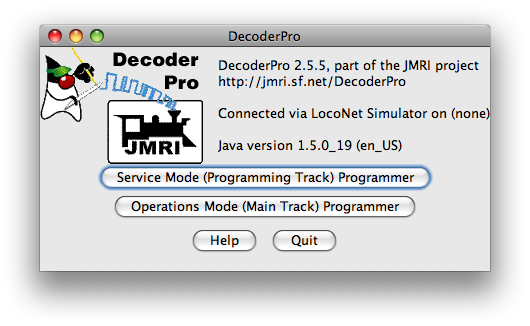
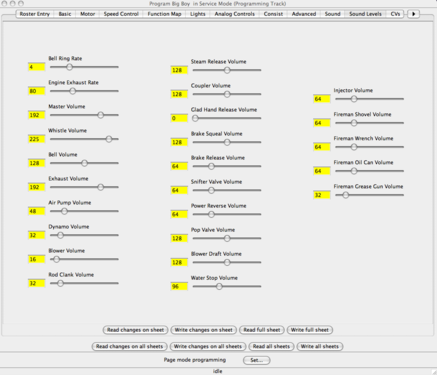
Screenshot of Decoder Pro
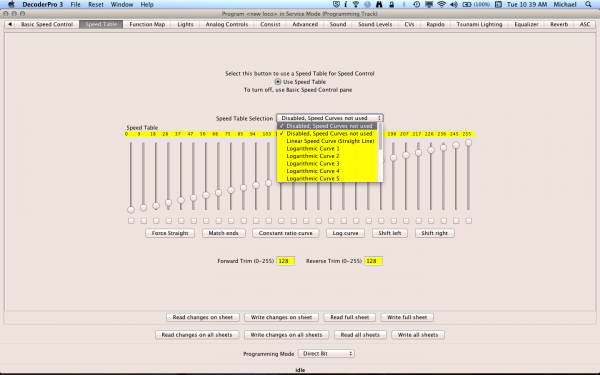
Speed Tables


If you need quick, simple-to-use, cross-platform software for programming decoders (mobile and stationary), then this is the choice for you.
Many people that have expensive track control software still use this software for its ability to quickly program a wide range of decoders. The JMRI suite of programs runs on Mac Classic and OS X, Linux, and Windows machines, all under Java. All major manufacturers of DCC equipment, systems and decoders, are supported.
JMRI - Layout Automation
Layout Automation applications provide a large number of ways of automating your layout, ranging from simple fill-in forms to full-fledged scripting and programming capabilities. These include:
- Routes
- A simple form of automation is to define Routes, which allow you to simplify the control of your turnouts.
- Signal logic
- JMRI provides built-in signalling logic which can be used to drive your signal heads in many applications.
- Scripting
- JMRI provides a very powerful scripting tool. Based on a real programming language, it gives you access to all the JMRI capabilities.
- Writing your own code in Java
- The JMRI libraries greatly simplify writing a program to make your layout do exactly what you want.
JMRI - PanelPro
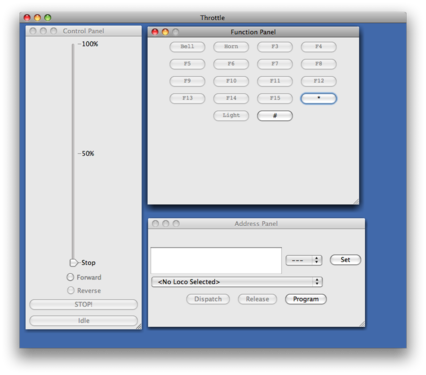
PanelPro's on screen throttle
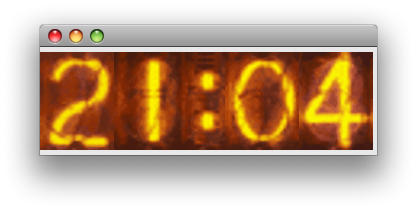
NIXIE Style Fast Clock


PanelPro is an application for operating CRT based CTC control panels that reflects the real-time state of your railroad and let you control it - almost like a Prototype dispatcher.
JMRI - LocoNet™ Tools
LocoNet Tools contain a number of LocoNet tools. Please see link for further details.
Summary:
- LocoNet monitor
- Display and log the traffic on the LocoNet, in either hex or human readable form.
- Slot monitor
- Watch the contents of the command station's slots as they're changed.
- Packet source
- A tool to let you type and send packets to the LocoNet
- BDL16, BDL162 and PM4 programmers
- A tool to let help you configure BDL16, BDL162 and PM4 boards.
- LocoIO programmer
- A tool to let help you configure a LocoIO board.
Hardware Issues
There is a known bug in JMRI 4.16 that can disable operation of a LocoBuffer-USB.
If you have a LocoBuffer-USB and this issue appears, the solution is to upgrade to version 4.17 or higher of the JMRI software.
JMRI Installation & Intro to DecoderPro
JMRI and RFID
JMRI Supports RFID readers using various methods. See their support article for more details: https://www.jmri.org/help/en/html/hardware/rfid/index.shtml
Lawsuit
JMRI was involved in a lawsuit that ended up benefiting the enter model railroad community. For details, see the Wikipedia article: Jacobsen v. Katzer lawsuit. The result was an important decision regarding Open Source Software. Even the NMRA became involved to protect their DCC Standards from questionable patents.
See Also
- DCC Software - Other DCC software
- JMRI has its own Wiki
- JMRI Decoder Definition website
JMRI® & DecoderPro® are registered trademarks of the JMRI Community. PanelPro™, SignalPro™, TrainPro™, DispatcherPro™, OperationsPro™ are trademarks of the JMRI Community.
- ↑ FDTI Drivers may brick counterfeit devices.